
articles / containers
Smaller Docker images, warmer layer caches
Image size and build speed look like separate problems, but most fixes for one help the other. Both come down to how the builder decides what it can reuse, and what ends up in the layers it keeps.
How the layer cache decides
A Dockerfile is a chain. Each instruction's result is cached against its parent layer and its own definition, and the first miss invalidates every instruction after it. What counts as the definition depends on the instruction:
- For
RUN, it is the command string. The builder has no idea what the command does, soRUN apt-get updatestays cached as long as the line is unchanged, stale package lists and all. - For
COPYandADD, it is a checksum of the files being copied. Modification times are ignored; contents are not. Change one byte of one copied file and the step misses.
Most of what follows comes from taking those two rules seriously.
Order by rate of change
Put what changes rarely first and what changes on every commit last. The usual offender copies the whole source tree before installing dependencies:
FROM node:22-bookworm-slim
WORKDIR /app
COPY . .
RUN npm ci
RUN npm run build
Every source edit invalidates COPY . ., so npm ci runs on every build. Copy the dependency manifests first, install, then copy the rest:
FROM node:22-bookworm-slim
WORKDIR /app
COPY package*.json ./
RUN npm ci
COPY . .
RUN npm run build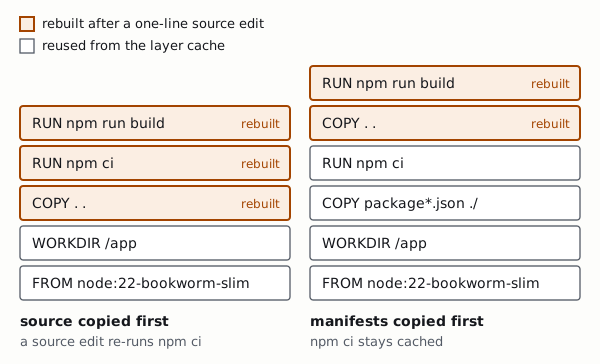
Send the builder less
COPY . . copies the build context, and the context is whatever you send the builder. Without a .dockerignore that includes .git, which changes with every commit even when no source file did, plus local node_modules, build outputs and editor files. Any of them can invalidate the copy for no reason, and some of them shouldn't be in an image at all.
.git
node_modules
dist
coverage
*.log
.env
The .env line isn't cosmetic: anything in the context can end up in a layer.
Cache mounts for package managers
With BuildKit, a RUN step can mount a cache directory that survives between builds on the same builder but never becomes part of the image:
RUN --mount=type=cache,target=/root/.npm \
    npm ci
When the lockfile changes, npm ci still re-runs, because the layer cache can't help, but it fetches only what's new instead of everything. The same pattern works for pip, Go's module and build caches, Cargo and most other package managers. Two caveats: cache mounts live on the builder, so a fresh CI builder starts with them empty; and they aren't included when you export the layer cache with --cache-to, as described in Where CI time actually goes.
Ship only the result
The build needs compilers, development dependencies and the source tree; the running service needs none of them. A multi-stage build keeps them apart, and the final image contains only what you copy into it:
# syntax=docker/dockerfile:1
FROM node:22-bookworm-slim AS build
WORKDIR /app
COPY package*.json ./
RUN --mount=type=cache,target=/root/.npm npm ci
COPY . .
RUN npm run build && npm prune --omit=dev

FROM node:22-bookworm-slim
WORKDIR /app
ENV NODE_ENV=production
COPY --from=build /app/package.json ./
COPY --from=build /app/node_modules ./node_modules
COPY --from=build /app/dist ./dist
USER node
CMD ["node", "dist/server.js"]
BuildKit also skips stages the target doesn't need and builds independent stages in parallel, so splitting a long Dockerfile into stages can speed it up even before anything gets smaller.
For compiled languages the gap is larger. A statically linked Go binary needs almost nothing at run time:
FROM golang:1.25 AS build
WORKDIR /src
COPY go.mod go.sum ./
RUN go mod download
COPY . .
RUN CGO_ENABLED=0 go build -trimpath -ldflags="-s -w" -o /out/server ./cmd/server

FROM gcr.io/distroless/static-debian12:nonroot
COPY --from=build /out/server /server
ENTRYPOINT ["/server"]
-trimpath keeps build paths out of the binary, which also helps reproducibility. -s -w drops the symbol table and DWARF debug information; panics still print readable stack traces. The distroless static base provides CA certificates, time zone data and a non-root user, and little else: no shell and no package manager.
Layers you can't take back
Deleting files in a later instruction doesn't make an image smaller. The files are still in the earlier layer; the later one only records that they were removed. Clean up in the same RUN that made the mess:
RUN apt-get update \
 && apt-get install -y --no-install-recommends ca-certificates tzdata \
 && rm -rf /var/lib/apt/lists/*
Putting update and install in one step also fixes the stale-index problem from the start of this article, because the two are now cached, and invalidated, together. Secrets follow the same logic: a token passed as a build argument, or written to a file and deleted later, can be recovered from the image's history or layers. Use RUN --mount=type=secret, which makes the value available only while that one step runs.
Look before you optimise
docker history lists an image's layers with their sizes and the instructions that created them. dive lets you browse each layer's files and points out space wasted on files that a later layer removes or overwrites. A few minutes with either usually shows where the size really is.
Smaller isn't automatically better, either. Alpine-based images use musl instead of glibc, which occasionally changes behaviour or performance in ways that are hard to debug, and images without a shell make interactive debugging harder. A slim Debian or Ubuntu base is a sensible default; spend the effort on what goes into your own layers. Once builds need to be reproducible, pin the base by digest (FROM node:22-bookworm-slim@sha256:…) and let an update bot propose new digests, because a tag such as 22-bookworm-slim moves whenever upstream rebuilds it.
Questions or corrections: hello@kettlebuild.org